
প্রযুক্তি সম্পর্কে প্রশ্ন করুন!
এটি একটি প্রযুক্তি হেল্প ও সাপোর্ট কমিউনিটি, যেখানে ব্যবহারকারীরা সহজেই তাদের প্রযুক্তি সমস্যা তুলে ধরতে পারবেন, এবং অন্যদিকে অভিজ্ঞতার আলোকে পরামর্শ শেয়ার করতে পারবে।
Create A New AccountJoin TechPoth Forum Today! এটি একটি প্রযুক্তি হেল্প ও সাপোর্ট কমিউনিটি যেখানে ব্যবহারকারীরা সহজেই তাদের প্রশ্ন করতে পারে, অভিজ্ঞতার আলোকে পরামর্শ শেয়ার করতে পারে এবং প্রয়োজনীয় সমাধান খুঁজে পেতে পারে। এখানে নতুন থেকে শুরু করে অভিজ্ঞ সবাই একে অপরের সঙ্গে যুক্ত হয়ে আলোচনা করতে পারবেন এবং দ্রুত ও কার্যকরভাবে সমস্যার সমাধান করতে পারবেন। সবচেয়ে বড় বিষয় হলো—এটি সম্পূর্ণ ফ্রি, যাতে জ্ঞান ও সহায়তা সবার কাছে পৌঁছে যায়।
TechPoth Forum একটি প্রযুক্তি হেল্প ও সাপোর্ট কমিউনিটি যেখানে ব্যবহারকারীরা সহজেই তাদের প্রশ্ন করতে পারে, অভিজ্ঞতার আলোকে পরামর্শ শেয়ার করতে পারে এবং প্রয়োজনীয় সমাধান খুঁজে পেতে পারে। এখানে নতুন থেকে শুরু করে অভিজ্ঞ সবাই একে অপরের সঙ্গে যুক্ত হয়ে আলোচনা করতে পারবেন এবং দ্রুত ও কার্যকরভাবে সমস্যার সমাধান করতে পারবেন। সবচেয়ে বড় বিষয় হলো—এটি সম্পূর্ণ ফ্রি, যাতে জ্ঞান ও সহায়তা সবার কাছে পৌঁছে যায়।
Lost your password? Please enter your email address. You will receive a link and will create a new password via email.
Please briefly explain why you feel this question should be reported.
Please briefly explain why you feel this answer should be reported.
Please briefly explain why you feel this user should be reported.
এটি একটি প্রযুক্তি হেল্প ও সাপোর্ট কমিউনিটি, যেখানে ব্যবহারকারীরা সহজেই তাদের প্রযুক্তি সমস্যা তুলে ধরতে পারবেন, এবং অন্যদিকে অভিজ্ঞতার আলোকে পরামর্শ শেয়ার করতে পারবে।
Create A New Account
Private: Why is WPForms not displaying on the page?
WPForms may fail to display due to JavaScript conflicts, incorrect shortcode implementation, caching issues, theme compatibility problems, or security restrictions. Follow these 7 proven solutions to resolve the issue in under 20 minutes. ⚙️ 2. Resolve JavaScript Conflicts Symptoms: Form area blankRead more
WPForms may fail to display due to JavaScript conflicts, incorrect shortcode implementation, caching issues, theme compatibility problems, or security restrictions. Follow these 7 proven solutions to resolve the issue in under 20 minutes.
⚙️ 2. Resolve JavaScript Conflicts
Symptoms: Form area blank or spinner stuck.
Diagnosis:
Open browser console (
Ctrl+Shift+J):Look for errors like
wpforms.min.js failed to loadDeactivate plugins one-by-one starting with:
Security plugins (Wordfence, Sucuri)
Optimization tools (Autoptimize, WP Rocket)
Ad blockers (if testing locally)
Fix: Add to
functions.php:🧩 3. Disable Caching/AJAX Settings
Critical configuration:
Go to WPForms → Settings:
General → Disable CSS: ❌ Uncheck
General → Load Assets Globally: ✅ Check
Recaptcha → Disable AJAX: ❌ Uncheck
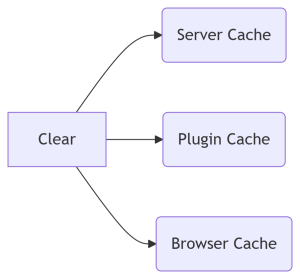
Clear all caches:
See lessPrivate: How do I fix canonical URL issues in Rank Math?
Rank Math canonical URL problems typically stem from plugin conflicts, incorrect settings, theme overrides, or conflicting SEO tools. Follow these 7 proven fixes to resolve "duplicate canonical tags" or "wrong canonical URLs" permanently. 🔍 1. Identify the Issue (Quick Diagnosis) First, confirm theRead more
Rank Math canonical URL problems typically stem from plugin conflicts, incorrect settings, theme overrides, or conflicting SEO tools. Follow these 7 proven fixes to resolve “duplicate canonical tags” or “wrong canonical URLs” permanently.
🔍 1. Identify the Issue (Quick Diagnosis)
First, confirm the error:
View page source (
Ctrl+U) → Search forcanonicalLook for:
Multiple canonical tags
Incorrect URLs (e.g., HTTP vs HTTPS, wrong pagination)
🛠️ 2. Configure Rank Math Canonical Settings
Critical settings:
Go to Rank Math SEO → Titles & Meta → Global Settings
Verify:
✅ Canonical URL set to Open Graph URL
✅ Auto-generate Canonical URL enabled
❌ Remove Add Canonical Link if duplicates persist
For paginated content:
Enable Add
rel="prev"&rel="next"Need a quick fix? Contact our team at TechPoth — Get it solved within 24 hours!
See lessPrivate: Why is the ElementsKit sticky header not working as expected?
ElementsKit sticky header may fail due to incorrect configuration, JavaScript conflicts, CSS priority issues, or caching. Follow these 7 proven fixes to restore full functionality. 🚨 1. Verify Sticky Settings (Most Common Fix) Critical configuration checks: Setting Required Value Sticky On Desktop +Read more
ElementsKit sticky header may fail due to incorrect configuration, JavaScript conflicts, CSS priority issues, or caching. Follow these 7 proven fixes to restore full functionality.
🚨 1. Verify Sticky Settings (Most Common Fix)
Critical configuration checks:
Desktop + Mobile(or desired devices)Slide DownorFade In(not “None”)Top(or custom position if intentional)How to adjust:
Edit header in Elementor → Click Sticky Header tab
Ensure “Enable Sticky” is ON
Set Offset to
0for top-positioned headers⚙️ 2. Resolve JavaScript Conflicts
Symptoms: Header works initially but breaks after scrolling.
Solutions:
Temporary plugin deactivation:
Deactivate all plugins except Elementor + ElementsKit
If fixed, reactivate plugins one-by-one to find culprit
Add conflict resolution code (
functions.php):Private: Why are ElementsKit widgets not loading properly in the Elementor editor?
ElementsKit widgets may fail to load in Elementor due to JavaScript conflicts, outdated software, server resource limits, or caching issues. Follow these 7 proven fixes to resolve the problem immediately. 🚨 1. Clear Elementor & Site Cache (First Step!) Why it helps:Cached files often break ElemeRead more
ElementsKit widgets may fail to load in Elementor due to JavaScript conflicts, outdated software, server resource limits, or caching issues. Follow these 7 proven fixes to resolve the problem immediately.
🚨 1. Clear Elementor & Site Cache (First Step!)
Why it helps:
Cached files often break Elementor’s live editor functionality.
How to fix:
Elementor regeneration:
Go to Elementor → Tools → Regenerate Files → Click Regenerate Files
Clear all caches:
Server cache (Cloudflare, LiteSpeed)
Browser cache (
Ctrl+Shift+Rhard reload)Caching plugins (WP Rocket, W3TC)
We hope your issue has been resolved. If you’re still experiencing problems, please feel free to contact us anytime.
Need a quick fix? Contact our team at TechPoth — Get it solved within 24 hours!
See lessPrivate: How to Create a Coupon Code in WooCommerce?
This post with answered publised by FixxWP wordpress fixing team. If you face any issue to resolve your issue as follow to this guide. Please feel free to ask me anytime.
This post with answered publised by FixxWP wordpress fixing team. If you face any issue to resolve your issue as follow to this guide. Please feel free to ask me anytime.
See lessPrivate: How to Remove Horizon Scrollbar in WordPress?
This problem is submitted with the live example of our TechPoth team. Thank you team for this update.
This problem is submitted with the live example of our TechPoth team. Thank you team for this update.
See lessWhy is Rank Math showing duplicate meta tags in source code?
Rank Math showing duplicate meta tags (like title, description, or canonical) in your HTML source code typically happens due to theme/plugin conflicts, incorrect SEO settings, or multiple output triggers. This guide walks you through 7 proven fixes with scripts, screenshots, and debugging tactics. 🚨Read more
Rank Math showing duplicate meta tags (like
title,description, orcanonical) in your HTML source code typically happens due to theme/plugin conflicts, incorrect SEO settings, or multiple output triggers. This guide walks you through 7 proven fixes with scripts, screenshots, and debugging tactics.🚨 1. Identify the Duplicate Tags
First, confirm which tags are duplicated:
View your page source (
Ctrl+U):Search for
<title>,meta name="description", orrel="canonical".Note the duplicates:
🔧 2. Disable Conflicting Theme/Plugin Output (Most Common Fix)
Why it happens:
Your theme or another plugin (e.g., Yoast, All in One SEO) might be generating meta tags independently of Rank Math.
How to fix:
For themes:
Go to Theme Settings → SEO Options (in themes like Astra, Divi, Avada).
Disable: Meta Tags, Open Graph, and Canonical URL settings.
https://rankmath.com/kb/how-to-disable-all-generated-seo-tags/
For plugins:
Deactivate plugins one by one (especially SEO plugins) using Plugins → Installed Plugins.
After each deactivation, check your source code.
⚙️ 3. Reset Rank Math’s Advanced Settings
Misconfigured modules cause double-tagging:
Go to Rank Math SEO → Dashboard.
Under Advanced, disable these temporarily:
Schema Markup
Open Graph
Twitter Card
Clear caches and recheck.
We hope your issue has been resolved. If you’re still experiencing problems, please feel free to contact us anytime.
See less